Android
- OS: Android 8.0 or later
- Browser: Chrome (recommended) or Firefox
- PWA install: Chrome menu > Add to Home Screen
App at BetRepublic: 12,800+ Games on Mobile
12,800+ pokies, 600+ live dealer tables and sports betting on AFL, NRL and cricket, all from your phone browser or home-screen shortcut. No app store required.
Your Full Casino in Your Pocket
12,800+ pokies, 600+ live dealer tables and sports betting on AFL, NRL and cricket, all from your phone browser or home-screen shortcut. No app store required.
Play on Mobile 18+ only. Gambling involves risk of harm and can become addictive. Bonus terms apply.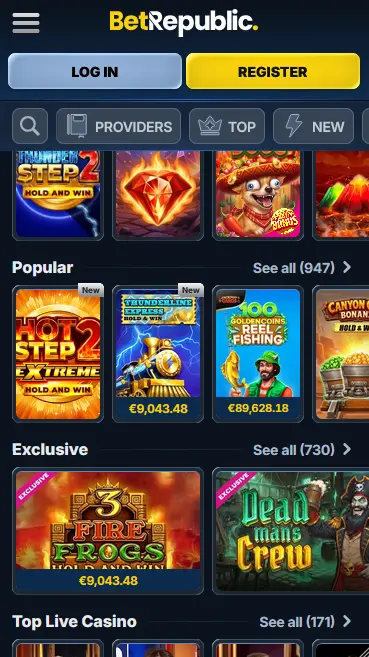
Mobile Play at BetRepublic
Pros
Cons
Stay Safe on Mobile
What You Should Do
What You Should Avoid
Device Requirements
Android
iOS
What the Mobile Experience Delivers
Full Library on Mobile
Every pokie from Pragmatic Play, Nolimit City and Hacksaw Gaming loads in the mobile browser. The sportsbook and live tables are equally accessible.
Fast Load Times
BetRepublic's mobile site is built for speed. Games from Relax Gaming and Play'n GO launch without lengthy buffering, even on standard 4G connections.
Secure Mobile Sessions
SSL encryption applies to every mobile session. Biometric login via Face ID or fingerprint is supported on compatible devices through the browser.
How to Install BetRepublic on Your Phone
The mobile cashier at BetRepublic gives Australian players access to the same payment options as the desktop version. AUD is the account currency throughout, so no conversion is applied to deposits or withdrawals made through the mobile interface.
Deposits via the mobile browser are accepted through Mastercard, bank transfer, Paysafecard, Revolut, Skrill, Neteller, RPDT and cryptocurrencies including Bitcoin, Ethereum, Litecoin and Solana. Skrill and Neteller deposits do not qualify for the welcome package. Cryptocurrency deposits have a higher minimum ($30 for Bitcoin) while card and bank methods start from $10.
| Method | Deposit Speed | Withdrawal Speed |
|---|---|---|
| Mastercard | Instant | Up to 3 business days |
| Bank Transfer | Same day | Up to 3 business days |
| Skrill | Instant | Up to 3 business days |
| Neteller | Instant | Up to 3 business days |
| Bitcoin | 1-3 confirmations | Faster than bank methods |
| Ethereum | 1-3 confirmations | Faster than bank methods |
All cashier transactions on mobile are protected by the same SSL encryption layer as the desktop site. Financial data is transmitted through a secure channel and is not accessible through the player-facing account interface. Identity verification via an Australian driver’s licence, passport or Medicare card plus a proof of address such as a utility bill or bank statement is required before the first withdrawal is processed.
BetRepublic’s full catalogue is available through the mobile browser and the PWA shortcut. There is no restricted game list for mobile players.
More than 12,000 pokie titles are accessible on mobile, all built in HTML5 for touch-optimised play. Titles from Pragmatic Play (Gates of Olympus, Sweet Bonanza, Dog House Megaways), Nolimit City (Mental), Hacksaw Gaming, Play’n GO (Book of Dead), Relax Gaming and BGaming all load in portrait and landscape orientations. Megaways mechanics, bonus-buy slots and progressive jackpot slots function identically on mobile to their desktop counterparts. The lobby search and category filters (Megaways, Bonus Buys, New Games) are available in the mobile interface.

All 600+ live dealer tables from Pragmatic Play Live, Ezugi and Vivo Gaming are available on mobile. Live roulette, blackjack, baccarat and casino poker stream in HD to mobile browsers on 4G and home Wi-Fi connections. Live sessions load directly from the lobby without requiring additional software.

Digital table games including blackjack, roulette, baccarat and poker are fully playable on mobile. Touch controls replace mouse inputs, and the interface adapts to smaller screens without reducing functionality.

BetRepublic’s 1,300+ jackpot games, covering both progressive and fixed prize titles, are accessible in the mobile lobby. The jackpot category filter in the lobby makes it straightforward to browse available titles on a phone screen.
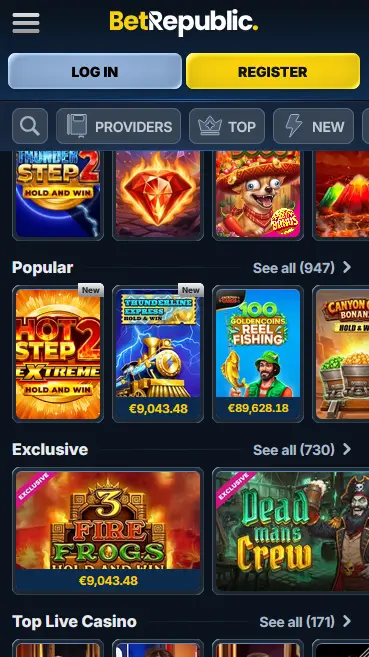
BetRepublic’s mobile experience is delivered through a progressive web app (PWA) that runs in the device’s browser. No file download is required for basic access, and the PWA shortcut provides an enhanced full-screen experience with home-screen icon behaviour.
Chrome on Android 8.0 or later gives the smoothest experience. The three-dot menu in Chrome exposes the “Add to Home Screen” or “Install app” option that creates the PWA shortcut. Once installed, the shortcut opens BetRepublic in a standalone full-screen window. Auto-updates apply silently each time the shortcut is launched while connected to the internet.
Safari on iOS 14.0 or later is required for Add to Home Screen functionality on Apple devices. The Share button at the bottom of the Safari toolbar exposes the option. After confirming, the BetRepublic icon appears on the home screen and launches in full-screen mode. Firefox and Chrome on iOS do not support Add to Home Screen in the same way, so Safari is the recommended browser for iPhone and iPad users installing the shortcut.
The table in the device specifications above covers the minimum OS and browser versions for each platform. In practice, any smartphone purchased within the past four to five years will exceed these requirements without any additional configuration.
Installation of the BetRepublic PWA shortcut follows a three-step process, detailed in the steps card above. The key distinction from a native app is that there is no file to download from a store. The shortcut references the live website, meaning it always reflects the current version of the casino without requiring manual updates.
Open Chrome on your Android device, navigate to betrepublicaussie.com and wait for the page to load fully. Tap the three-dot menu in the upper-right corner and look for “Install app” or “Add to Home Screen.” Tap the option and confirm. The icon will appear on your home screen within a few seconds. Open it and log in with your BetRepublic credentials.
Open Safari on your iPhone or iPad and go to betrepublicaussie.com. Once the page loads, tap the Share icon, which is the box with an upward arrow located at the bottom of the Safari screen on iPhone or at the top-right on iPad. Scroll through the share sheet and tap “Add to Home Screen.” Enter a name for the shortcut if you wish to change the default, then tap “Add.” The icon appears on your home screen and opens the site in full-screen mode.
For both platforms, the PWA shortcut is the recommended installation method. It provides home-screen icon behaviour, full-screen launch and, on Android, the option to receive push notifications for promotions and bonus activations. The shortcut is always up to date because it loads the live site rather than a cached local file.
New players register through the website at betrepublicaussie.com. The registration form requests personal details including name, email address and date of birth. Once submitted and verified by email, the account is active. A first deposit of $30 AUD or more through the mobile cashier activates eligibility for the welcome package. For the full welcome bonus conditions and wagering requirements, visit the full bonus terms.
Returning players enter their registered email address and password on the login screen. On devices that support biometrics, the browser will offer to confirm saved credentials using Face ID or a fingerprint scan instead of typing. Sessions on personal devices remain active until the player explicitly logs out, so frequent players do not need to re-enter credentials on every visit. For troubleshooting and step-by-step login guidance, see the BetRepublic login page.
The mobile experience at BetRepublic includes the full casino lobby, sportsbook and account management tools without any feature reduction relative to the desktop version. Live betting on AFL, NRL and cricket is available in real time through the mobile browser, with odds updating dynamically as matches progress. The My Bonuses section, where welcome package stages and weekly promotions are activated, is fully functional on mobile. VIP programme status, withdrawal history and identity verification document uploads are also accessible through the account section on phone.
The PWA shortcut adds full-screen mode and home-screen presence, which are the primary differences from using BetRepublic in a standard browser tab. Push notifications for new promotions are available through the PWA on Android. On iOS, notifications through a PWA are supported from iOS 16.4 onwards. There are no features exclusively available on desktop that are absent from the mobile interface.
SSL encryption is active across every page and transaction on the BetRepublic mobile site. This means that account credentials, payment details and session data are encrypted during transmission. The same certificate applies to both the desktop and mobile versions of the site.
Two-factor authentication can be enabled in account settings. When activated, a one-time code generated by an authenticator app is required after the password is entered. This makes unauthorised access significantly harder even if login credentials are exposed. 2FA is available through the mobile interface in the same way as on desktop.
On compatible iPhones, iPads and Android devices, the browser’s credential manager can store your BetRepublic login and confirm it using Face ID or a fingerprint scan. This removes the need to type your password on a small keyboard while maintaining security. Biometric access does not bypass 2FA if that feature is also enabled; both steps apply in sequence.
The $3,000 AUD welcome package and 200 free spins on Riches Express are fully claimable through the mobile browser. After depositing via the mobile cashier, navigate to My Bonuses in your account and activate the offer. The free spins on Riches Express (Pragmatic Play) can be used directly in the mobile lobby. Wagering requirements apply: 35x on the combined deposit and bonus for the deposit match, and 40x on free spin winnings, both within a 10-day window. 18+ only. Gambling involves risk.
Live chat is accessible from the site footer on mobile and connects to a live agent rather than an automated bot. Email support is available at [email protected]. Both channels operate 24 hours a day, seven days a week, with staffing covering Australian Eastern Standard Time (AEST) and Australian Eastern Daylight Time (AEDT).
Players who need to limit or pause their play can request self-exclusion through the support team via live chat or by emailing [email protected]. Self-exclusion applies to the account across all devices and platforms. BetRepublic also provides referrals to independent support organisations for players seeking external assistance with gambling behaviour. 18+ only.
App Questions Answered
No. BetRepublic does not currently offer a native app in either store. Players use the mobile-optimised website or install a PWA shortcut to their home screen for a full-screen experience.
Android 8.0 or later running Chrome is recommended. Most devices purchased in the last five years meet this requirement without any updates needed.
Yes. The full cashier is available on mobile, so you can deposit, activate your bonus in My Bonuses and play Riches Express free spins entirely through the browser or PWA shortcut.
Yes. All studios in BetRepublic's catalogue, including Pragmatic Play, Nolimit City, Hacksaw Gaming and Play'n GO, publish games in HTML5, which is optimised for mobile browsers and touch interfaces.
Open BetRepublic on Your Phone
Grab 100% up to $3,000 and 200 free spins.
Enter the Casino 18+ only. Gambling involves risk of harm and can become addictive. Bonus terms apply.